跳至主要内容

How to Download Xentry Patch to Fix 2020.03 MB SD C4 “The data are faulty” Error

Customer problem: After the 03.2020 MB SD C4 Xentry software updates automatically, I couldn’t login. And a fault message pops up with the words “The data are faulty”. Now I cannot do anything. How to solve?


Solution from cardiagtool.co.uk engineer:
The error maybe caused by clicking the upgrade icon to update software.


Please solve this error by the following steps:
Step 1: Free download the following link to fix.
Password: eswr9a
Size: 2GB
Security: No risk!

Step 2: Start Task Manager to end these process incl. “AddOnCenter.exe”, “Java.exe” and “javaw.exe”


Step 3: Open Dish [C:] to find “AddOnCenter.exe”
Note: If you only can see “AddOnCenter” as below, open “Organize” -> select “Folder and search options”-> select “View”-> remove the tick of “Hide extensions for known file types” and click “Apply”.


Then “AddOnCenter.exe” appears on the screen
Step 4: Change the file name “AddOnCenter.exe” to “AddOnCenter.ex-1”, then it will not update automatically.

Step 5: Delete these 12 items from Disk [C:] incl. Bilder, bin, fusoko, Kontexte, llist, Mappings, NFZ, Templates, matainfo.txt, metaunfo_dara.txt, start_Xentry.ini and ValidPeriod.txt as shown in the following pictures.


Step 6: Open Driver [F:]-> click “Mount Image”-> Open


Step 7: Select “Xentrypatch202003.iso” installed in Disk [C:] and click “Open”
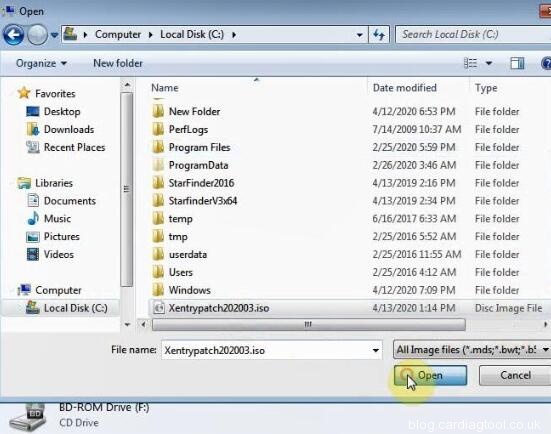
Step 8: Click “Open folder to view files”

Step 9: Copy all the items in the Xentrypatch file to Disk [C:] Xentry file


Step 10: After finish copying process, restart the computer and then can run 2020.03 MB SD C4 Xentry software


Video reference:


Note: If you have the error “The data are faulty” when running 2019.12 Xentry software, you also can refer to the solution above to solve, the difference is that you need to download the Xentrypatch2019.12 as below.
Source:
http://blog.cardiagtool.co.uk/free-download-xentry-patch-to-fix-2020-03-mb-sd-c4-the-data-are-faulty-error/

评论

此博客中的热门博文

Launch THINKPLUS USER MANUAL: Register, Update, Using Guide

Thinkcar Thinkplus  is a new Launch intelligent OBD2 full system  auto diagnostic tool . This article will share the related user manual. Part 1: Thinkcar Thinkplus introduction Part 2: Thinkcar Thinkplus how to register& update Part 3: Thinkcar Thinkplus using guide In detail… Part 1: Thinkcar Thinkplus introduction Thinkplus is a professional full-automotive quick scan tool for relevant industries, such as fast repair service, second-hand car and automobile insurance. It supports quick check and performs diagnosis report to you by email without any operation. All system tests only take 2 minutes. Thinkcar   Thinkplus Highlights: 1.Easy Testing: plug in OBD cable, without any extra operation 2.Diagnose automatically: generate diagnostic reports and send to email automatically 3.Complete diagnostic functions: OBD2 + Full System Diagnosis 4.Update automatically: software update automatically while connecting with wifi 5.Real-time voice bro...

Can OBDSTAR X300 DP Plus Read PinCode for Opel SIMTEC75 5 ECM?

Is it possible to read PinCode on Opel SIMTEC75 5 ECM by  OBDSTAR X300 PAD2 ? The answer is YES. Opel can read pin code via OBDII with X300 DP Plus. How to read pincode? Connect X300 DP plus key programmer to Opel SIMTEC75 5 ECM Enter main menu Select “Diag Program”-> “IMMOBILISER” Search “OPEL” by input the car brand in the quick searching textbox Select  OPEL V30.44 Initializing diagnostic data… Select  OPEL ->  Read PinCode ->  BY ECM System ->  Manual ->  ME75.5    Pay attention to the information: This function is available by connecting the server, please ensure the internet connection is normal. Connecting the server… Reading PinCode… Then read out PinCode success Besides read pincode, OBDSTAR X300 DP Plus also supports these IMMOBILISER functions: show key account, add keys, do all keys lost, program remote and other functions for OPEL. Check the car ...

Free Download Xhorse VVDI2 V6.7.0

Newest VVDI2 full version software V6.7.0  mainly adds unlock CAS4 fast mode (5M48H/1N35H/1L15Y) & Toyota 8A all key lost, and fixes the bugs of older version. Offered the related update notice and tested link to free download. Free Download V6.7.0 VVDI2: https://public-ap-southeast-1-1251058331.s3-ap-southeast-1.amazonaws.com/download/product/vvdi2/software/VVDI2-InstallerV670.exe Size: 314MB VVDI2 V6.7.0 Updated on March 31 st , 2020: Require firmware V6.6.8 ===== VAG V6.7.0 ===== 1.Improvement for auto detect VAG immobilizer system 2.Bugfix ===== BMW V6.7.0 ===== 1.Add unlock CAS4 fast mode (5M48H/1N35H/1L15Y):    1).Unlock CAS4 only requires 2 minutes    2).Support backup D-FLASH (EEPROM), P-FLASH via OBDII    3).Support exchange CAS4...